How I shipped a 3-week-old design handoff in 18 minutes with Claude Code

Episode 2 of "Production Claude Code: the /powerup deep dive." The series builds SoccerSkills.app live on camera across 10 episodes, each mapped to a /powerup lesson. This one maps to lesson #2: shift+tab and the four execution modes.
Last updated: 2026-05-07
The handoff arrived three weeks ago. Tokens, prototype JSX, a brand identity PDF I never opened, a README that started with "hey designer here, here's the deck." I dragged the folder into the repo, scrolled the prototypes for maybe four minutes, closed the tab, and went back to whatever else I was doing. Three weeks went by.
The reason it sat: translating somebody else's design handoff into your production code is mostly mechanical and slightly insulting. You don't get to pick the spacing scale. You don't get to argue the variable names. You bounce between prototype HTML and your actual component primitives and a Figma export that won't render the same way in Tailwind. Somewhere on day two you decide you need a 22-pixel spacing step that nobody asked for. I have done this kind of work before. I did not want to do it again.
Today I sat down for eighteen minutes. Plan mode wrote the rollout. Auto mode ran the migration and wired up Resend. I made coffee. soccerskills.app is live with a working waitlist endpoint.
Here's what each of the four modes actually did. Plus the boring /permissions step that everyone skips.
Plan mode
Shift+tab until the status bar says "plan." I threw the whole handoff folder at it and asked it to write a rollout plan covering episodes 2, 5, and 7 of this series — three different cuts of the same handoff, sequenced.
Plan mode is the only Claude Code execution mode that physically can't write to your files. It can read everything, search the codebase, mention specific lines, produce a plan document. It cannot apply edits or run shell commands. So there was no permission decision to make when I gave it the entire docs/design_handoff_soccerskills/ folder. It just researched.
The output was about 200 lines of markdown. Architecture decisions. File lists. Sequencing for what each episode covers. Specific notes about the auth gate I'd want to handle separately in episode 5. I saved it as docs/series/design-rollout-plan.md so episodes 5 and 7 can link back to it later.
Quick aside if you've been using plan mode for a while: Claude Code now writes the plan into .claude/plans/ by default. That's new. Plans used to live in session memory and disappear when you closed the terminal. Now there's a real file on disk. The same dialog also offers an UltraPlan refinement pass for $5–$20 depending on size, which runs a doc-review on what plan mode produced. I skip it because compound engineering covers that beat for me, but if you're not already running a plan-review step it's a fair price for a sanity check.
Every multi-episode arc should have one of these documents. They cost two minutes of plan mode time and they save weeks of "wait, what was the original sequencing?" later. The artifact is the deliverable, not the conversation.
That property — that plan mode literally can't break anything — is what makes it the right entry point for unfamiliar work. You're not granting trust before you've seen what Claude wants to do. You're getting a written proposal. You can save it, edit it, throw it away, hand it to a teammate, ignore it.
Default mode for one careful change
Shift+tab back to default. There was one section of the rollout plan I wanted to tighten — the auth gate logic that gets bolted onto the dashboard in episode 5. Default's the mode where Claude asks for a y/n on every change. Annoying when you're rolling, exactly right when you're being careful about something specific.
Two prompts, two yeses, done. Took maybe a minute.
Accept-edits scaffolded the page
One shift+tab forward and I was in accept-edits. This mode trusts that you've already decided what should happen. No per-file approval. Edits land.
I asked it to implement src/app/page.tsx from the prototype layout, using the primitives in src/components/ui/. Six files, twenty seconds of writes. No prompts. The page rendered.
Funny detail Claude flagged in its summary: it converted the prototype's M dashes to N dashes on the way through. Dozens of them. The kind of fix I'd have hand-corrected in 200 places myself. It also ran lint and the TypeScript check on its own without being asked.
Accept-edits is dangerous when the plan is wrong. It ships changes fast without per-file review, which means a misaligned plan creates damage faster than you can react. The defense is to use plan mode first, vet the plan, then switch. Accept-edits is a leverage multiplier on whatever direction you've already set.
/permissions, the step nobody bothers with
Before the next mode, the boring move: configure /permissions. Auto mode (next up) still pauses for approval on every shell command if your allowlist is empty. Worst of both worlds — no per-edit review, but constant interruption.
I added two patterns to the allowlist:
Bash(bun *)Bash(drizzle-kit *)
Thirty seconds of typing. Now auto mode could actually do its job.
This is the step people skip. They turn on auto mode, watch it pause for permission on every bun install, decide auto mode is broken, and go back to default. The fix is configuring the allowlist. Not abandoning the mode.
Auto mode, while I made coffee
Shift+tab to auto. Then the prompt that did the heavy lifting:
Run the waitlist migration via 'bun db:migrate'. Implement the POST handler in
src/app/api/waitlist/route.ts to insert into the waitlist table and trigger a
Resend confirmation email. Then start the dev server and curl localhost:3000/api/waitlist
to verify.
Five things in one prompt. I walked away.
Came back three and a half minutes later. Migration applied. Route handler written. Dev server running on port 3000. Curl returned 200. The confirmation email was sitting in my test inbox. Coffee in my hand.
That's the thing. It isn't any single mode. It's the order. Plan first, then accept-edits, then auto inside an allowlist. Plan mode earns the right to use the others.
How long it actually took
Plan mode: two minutes.
Default: one minute.
Accept-edits: about a minute total, including the twenty seconds of writes.
/permissions: thirty seconds of typing.
Auto mode: three and a half minutes (with coffee in hand).
Reading what auto mode produced: a couple minutes.
Final smoke test in the browser: another couple minutes.
Eighteen minutes. After three weeks of avoiding it.
The avoidance, by the way, was correct. I would have spent six hours doing what auto mode did in three. The lesson isn't "Alex is lazy" (probably true, but separately). The lesson is that mechanical work has a different cost shape now. Defer it past the moment you actually need to ship and the cost stays low.
When each mode is the right one
Default for exploring, debugging, anything where you're not sure what Claude will touch. The y/n prompts feel like overhead but they're the cheapest way to catch a wrong assumption before it ships.
Plan for architecture decisions, multi-file changes, kicking off new features. Anywhere a written artifact you can save would be useful. Plan mode is also the right mode the first time you open an unfamiliar codebase — research without permission grants.
Accept-edits for bulk implementation when the plan is solid and you want the writes to land without prompts. The risk is real but bounded if the plan is right.
Auto for mechanical bounded work — migrations, builds, integration setups — inside a /permissions allowlist that scopes what shell commands can run. The allowlist is the safety mechanism. Without it, auto mode is either a y/n machine (allowlist empty) or a footgun (allowlist too permissive).
The mistake people make is using one mode for everything. Default for exploratory work that should have started in plan mode. Accept-edits when the plan is shaky. Auto with an empty allowlist that turns it back into a y/n machine. Each mode has a job. The wins come from sequencing them, not from picking a favorite.
Frequently asked questions
What does shift+tab do in Claude Code?
It cycles your session through default → accept-edits → plan → auto → back to default. The current mode shows in the status bar at the bottom. Switching doesn't lose context — your session and any loaded files persist.
What is plan mode and why is it different?
Plan mode is the only Claude Code mode that physically can't write to files or run shell commands. It just researches and proposes. That property is what makes it safe to use on unfamiliar codebases — you're not granting trust before you've seen what Claude wants to do. The output is a plan document you can save, edit, or throw away.
What is auto mode?
Auto mode runs long unattended tasks within a /permissions allowlist you control. It doesn't ask for per-action approval like default does, but it also doesn't run arbitrary shell commands — only the patterns you've allowlisted. It's the mode for bounded mechanical work where you want to walk away from the keyboard.
How do I configure /permissions?
Run /permissions in any Claude Code session. Add patterns like Bash(bun *), Bash(drizzle-kit *), or Bash(npm test) to allowlist specific shell commands. The allowlist is per-project and persisted to .claude/settings.json. Auto mode and accept-edits use this allowlist; default still prompts on every shell command regardless.
Can plan mode actually edit files?
No. That's the whole point. It can read files, search the codebase, and propose changes as a markdown document, but it cannot write or run commands. To apply a plan, switch to accept-edits or auto mode after reading the proposal.
What's the difference between accept-edits and auto?
Accept-edits applies file edits without per-file prompts but still pauses on shell commands. Auto applies file edits without prompts AND runs shell commands inside the /permissions allowlist without asking. Use accept-edits for pure code changes; use auto when the task includes commands like migrations or builds.
Should I always start in plan mode?
For multi-file changes, architecture decisions, or unfamiliar code — yes. The plan document itself becomes useful: you can save it, link to it from later episodes, share it with a teammate, treat it as a real artifact. For small targeted edits where you already know exactly what to change, default is faster.
What is yolo mode?
Yolo mode is community slang for --dangerously-skip-permissions, the CLI flag that bypasses the /permissions allowlist entirely. It runs every shell command auto mode encounters without checking. Auto mode plus a tight allowlist achieves most of what yolo mode does without the open-ended risk — reserve yolo mode for sandboxed environments where the worst case is acceptable.
Is accept-edits dangerous?
Accept-edits is dangerous when the plan is wrong. It ships changes fast without per-file review, which means a misaligned plan creates damage faster than you can react. The mitigation is to use plan mode first, vet the plan, then switch. Accept-edits is a leverage multiplier on whatever direction you've already set.
What happens if my /permissions allowlist is empty in auto mode?
Auto mode pauses for approval on every shell command, defeating the purpose. The pattern: write a small allowlist for what the current task needs (bun *, drizzle-kit *, etc.), then switch to auto. The allowlist is project-scoped, so each project can have its own.
Workshop
Running a 5-day workshop starting June 1 that walks through this exact setup on your own codebase, with me there to fix what doesn't translate. Early-bird $297 through May 15, $497 after. https://wotai.co/workshops/production-grade-claude-code
If you show up to session 1 and it doesn't change how you use Claude Code, just tell me. I'll refund you.
– Alex
Next episode is /rewind — I deliberately break a migration on the videos table and watch the whole thing unwind in four seconds.
Stop guessing. Score your first workflow.
Score one workflow in about five minutes. Nine questions, a grade, and the specific gap holding it back - no call required.
Related Posts
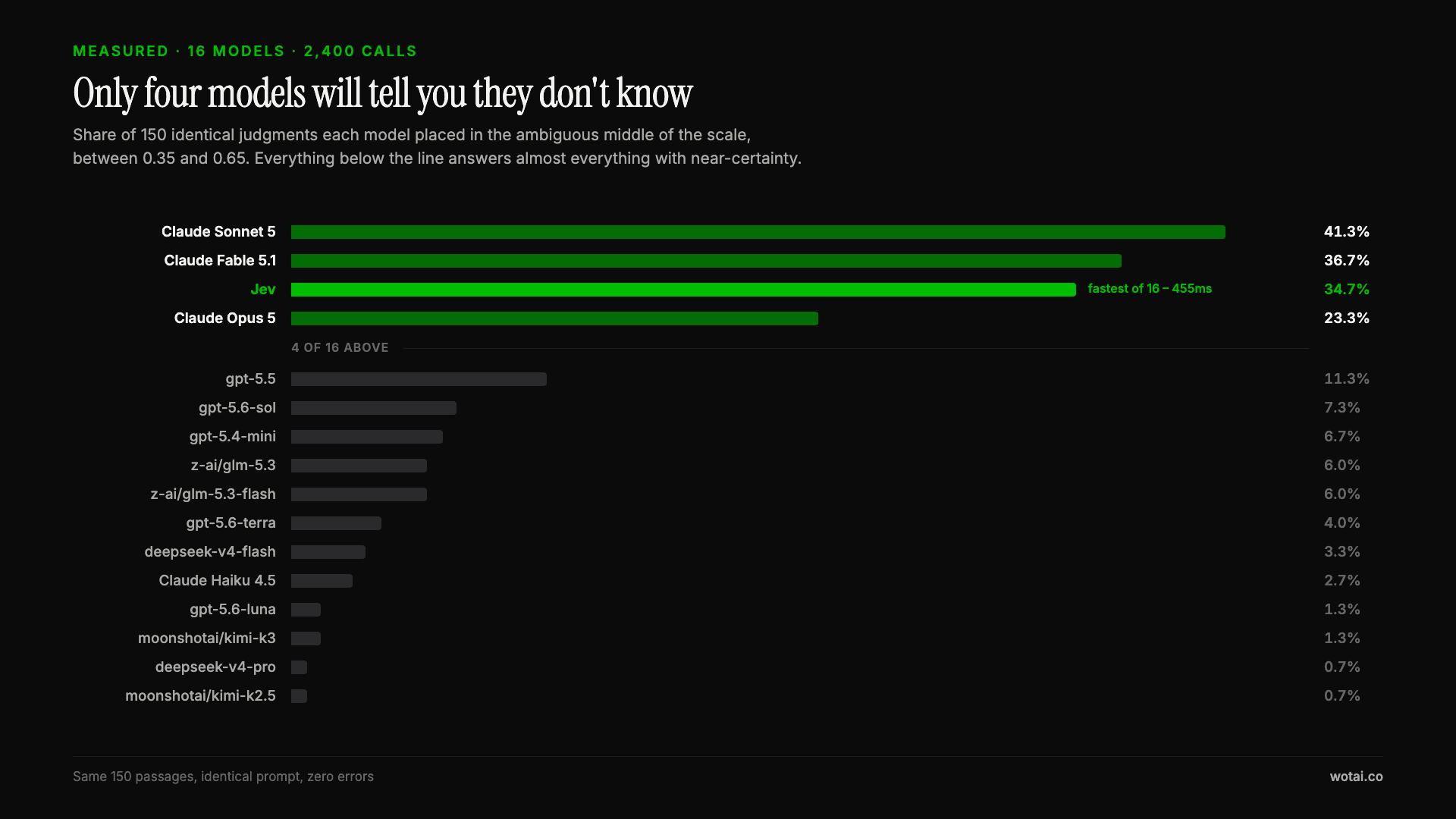
Jev is the only sub-second model that will tell you it doesn't know
Sixteen models on the same 150 passages, plus two more tasks. Only four of the sixteen will say they are unsure, and Jev is the only one of those four that answers in under a second.

AGENTS.md vs CLAUDE.md: which file your agent actually reads
Both files in one repo, measured: load order, token cost, and which one wins when they disagree. Every guide explains the difference; this one runs the test.

Compound engineering vs Superpowers: what each one installs
Both Claude Code plugins installed and measured: 14 skills against 33, one SessionStart hook against none, and the six skills that collide when you run both.