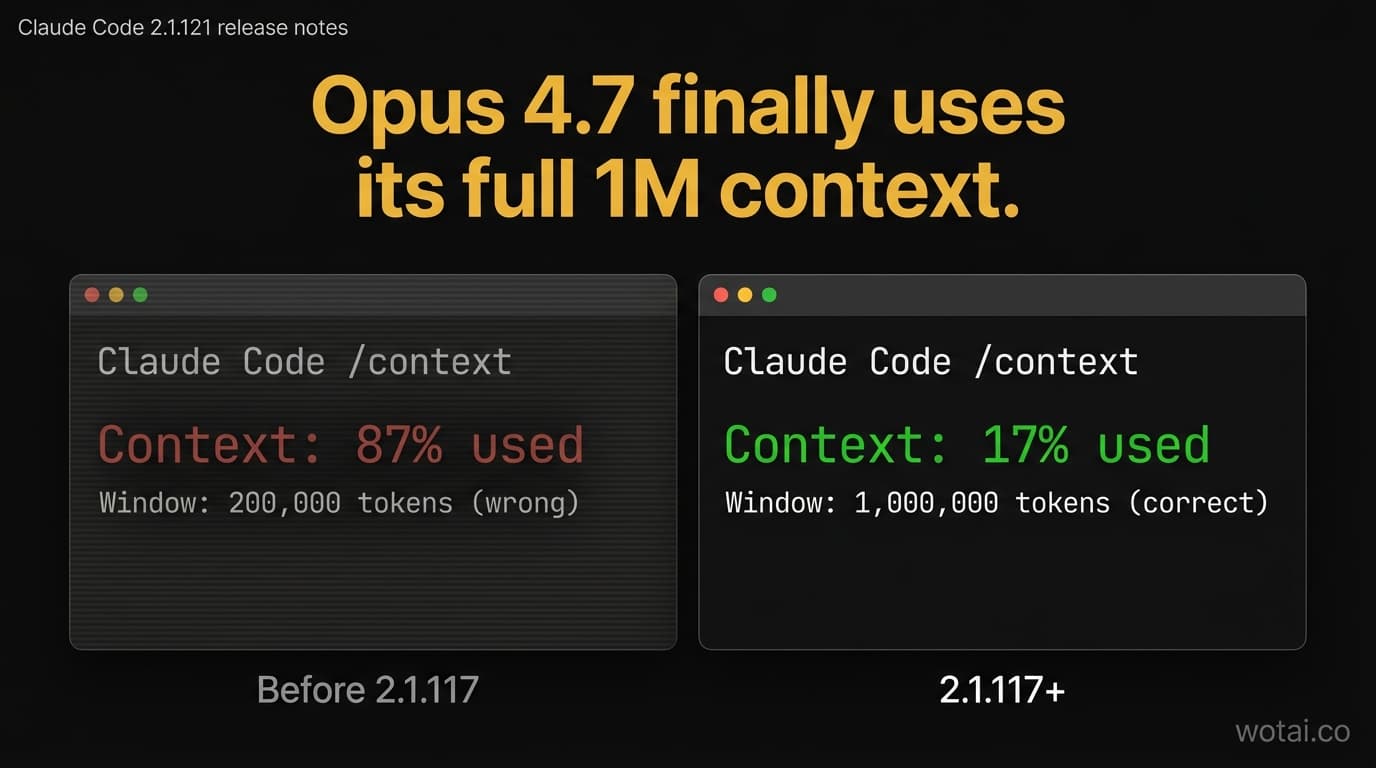
If you upgraded to Opus 4.7 and noticed Claude Code was hitting auto-compact faster than expected, you weren't imagining it. Through 2.1.116, Claude Code was computing your context-window usage against a 200,000-token ceiling instead of Opus 4.7's native 1,000,000. /context showed inflated percentages. Auto-compact fired roughly 5x earlier than it should have.
Claude Code 2.1.117 fixed it. And then 2.1.118, 2.1.119, 2.1.120, and 2.1.121 followed in the next six days.
That's five releases and 150+ individual changes since 2.1.116. Here's what actually matters.
The headline: Opus 4.7's 1M window now works as advertised
The bug was quiet but consequential. From the official changelog of 2.1.117:
Fixed Opus 4.7 sessions showing inflated
/contextpercentages and autocompacting too early – Claude Code was computing against a 200K context window instead of Opus 4.7's native 1M.
If you wrote a post about how the 1M window changes everything (we did, yesterday), this fix is what makes the technique actually pay off in practice. Before 2.1.117, you could load a @file:L10-L50 reference, see /context jump to 18%, and think "wait, why is that so high?" Because Claude Code was dividing your usage by 200K instead of 1M. Five times the apparent fill. Five times sooner to hit auto-compact.
Update to 2.1.121 (or any version since 2.1.117) and you'll watch /context finally show numbers that match reality.
Four memory leaks fixed (2.1.121)
If your Claude Code process has been climbing into multi-GB territory after a few hours, this release is for you.
- Unbounded RSS growth on image-heavy sessions – fixed. Sessions that processed lots of images were accumulating image data in memory without releasing it.
/usageleaking up to 2GB on machines with large transcript histories – fixed. Running/usageto check session cost shouldn't double your memory footprint.- Long-running tools that don't emit progress events were leaking memory while waiting – fixed.
findexhausting open file descriptors on large directory trees was crashing macOS and Linux native builds host-wide. Reduced peak FD usage in 2.1.121.
Add the fix where the Bash tool became permanently unusable when its starting directory got deleted mid-session, and the --resume crash on corrupt transcript lines, and 2.1.121 looks like a stability release on top of the feature work.
claude ultrareview now runs in CI (2.1.120)
/ultrareview was an interactive command. As of 2.1.120, you can run it non-interactively from a script:
claude ultrareview path/to/changes
claude ultrareview --json HEAD~1..HEAD > review.json
It prints findings to stdout, exits 0 on completion, exits 1 on failure. Pair with a GitHub Action or pre-merge hook and you get a multi-agent code review on every PR without anyone running it manually.
This is also the release where Windows users no longer need Git for Windows installed. If Git Bash isn't available, Claude Code falls back to PowerShell as the shell tool.
MCP and hooks got dramatically more programmable
Three changes across 2.1.118 and 2.1.121 expand what hooks and MCP can do:
alwaysLoad for MCP server config (2.1.121). Setting alwaysLoad: true on an MCP server makes all its tools skip tool-search deferral and stay available immediately. The trade-off: tool-search reduces token cost by deferring tools, but for small servers you call constantly, the round-trip overhead isn't worth the savings.
PostToolUse hooks can replace tool output for all tools (2.1.121). Previously this was MCP-only. Now any PostToolUse hook can return hookSpecificOutput.updatedToolOutput and Claude sees the modified version of any tool's result. Useful for redaction, trimming, or post-processing.
Hooks can invoke MCP tools directly (2.1.118). Use type: "mcp_tool" in your hook config to call an MCP tool from a hook without a shell shim. Combined with the previous change, hooks become a much more capable orchestration layer.
The smaller but still notable: claude plugin prune (2.1.121) removes orphaned auto-installed plugin dependencies, and plugin uninstall --prune cascades. If you've been collecting dead plugin deps after experimenting with marketplaces, this cleans them up.
Quality-of-life that compounds
A handful of 2.1.117 changes change the default experience:
- Default effort raised from
mediumtohighfor Pro and Max subscribers on Opus 4.6 and Sonnet 4.6. The model spends more thinking budget per turn by default. Override per-session with/effort. - Native builds replace Glob and Grep with embedded
bfsandugrepthrough the Bash tool – faster searches without a tool round-trip on macOS and Linux. Windows and npm-installed builds unchanged. /resumenow offers to summarize stale, large sessions before re-reading them, matching--resumebehavior.- Forked subagents on external builds via
CLAUDE_CODE_FORK_SUBAGENT=1.
And 2.1.119 was the polish release. Forty-five entries in that changelog. The ones to know:
/configsettings persist to~/.claude/settings.jsonproperly with override precedence.prUrlTemplatesetting points the footer PR badge at custom code-review URLs (handy for self-hosted GitLab, Bitbucket, GHE).--from-praccepts GitLab, Bitbucket, and GitHub Enterprise URLs, not just github.com.PostToolUsehooks includeduration_msin the input – you can finally measure how long tools actually took.- MCP servers reconfigure in parallel instead of serially during subagent spawn.
Vim, themes, and /usage
2.1.118 was the "small but appreciated" release:
- Vim visual mode and visual-line mode (
vandV) with selection and operators /costand/statsmerged into/usage(the old commands still work as typing shortcuts to the right tab)- Custom named themes via
/themeor hand-edited JSON in~/.claude/themes/. Plugins can ship themes via athemes/directory. DISABLE_UPDATESenv var to block all update paths including manualclaude update(stricter thanDISABLE_AUTOUPDATER)
If you've been wishing for a vim visual mode, it's there now.
Five releases at a glance
| Version | Date | Theme | Standouts |
|---|---|---|---|
| 2.1.121 | Apr 27 | Stability + MCP polish | 4 memory leaks fixed, alwaysLoad MCP option, PostToolUse output replacement for all tools, claude plugin prune, /skills filter |
| 2.1.120 | Apr 25 | CI + Windows | claude ultrareview non-interactive, Windows works without Git Bash, ${CLAUDE_EFFORT} in skills |
| 2.1.119 | Apr 24 | Polish (45 changes) | /config persistence, prUrlTemplate, GitLab/Bitbucket --from-pr, hook duration_ms, parallel MCP reconfigure |
| 2.1.118 | Apr 23 | UX | Vim visual mode, /cost+/stats→/usage, named themes, hooks call MCP directly |
| 2.1.117 | Apr 22 | The big one | Opus 4.7 1M context fix, default effort high, bfs/ugrep replace Glob/Grep on native builds |
The 2.1.117 release alone has more substance than most weekly drops. The Opus 4.7 fix is the single most-cited reason to update if you're on the new model.
Should you update?
Yes. Three checks first:
- If you have custom managed-settings or proxy config, retest after upgrading. 2.1.119 and 2.1.121 changed several edge-case behaviors –
NO_PROXYenforcement,DISABLE_TELEMETRYpropagation, telemetry attributes, OAuth token-refresh under contention. None of these break the happy path, but they may affect your specific setup. - If you script around
/costor/statsoutput, both still work as typing shortcuts to/usage, but the structured output changed. Re-validate any parsing. - If you have Plugin marketplaces with broken entries, 2.1.120 changed how malformed
marketplace.jsonentries are handled (the entry is shown but installing prompts you to update). Mostly harmless, but worth noting.
For everyone else, claude --version to confirm 2.1.121 and move on.
The pattern is clear: Opus 4.7 dropped 10 days ago, and Anthropic has shipped almost daily since to harden the runtime around it. That's the right priority for a model migration.
What's next
If you're getting Claude Code working in production and want the systematic version, the 10-episode "Production Claude Code" series just kicked off. Episode 1 (yesterday) covered the 1M context window. Episode 2 covers steering with modes – plan mode, auto mode, and /less-permission-prompts.
Until then: update, watch /context actually behave correctly, and enjoy a session that doesn't leak 2GB of RAM.
Stop guessing. Score your first workflow.
Score one workflow in about five minutes. Nine questions, a grade, and the specific gap holding it back - no call required.
Related Posts

Claude Cowork vs Claude Code vs chat: which to use for each job
Which Claude surface each teammate should use on a Team plan: chat for thinking, Cowork for finished files and tasks, Claude Code for software. How Cowork runs after the September and October 2026 changes, and what one seat shares across all three.

Claude plugins vs skills vs connectors vs Projects: which to use (2026)
Skills, plugins, connectors and Projects compared in one table: what each is, what it contains, where it runs in chat, Cowork and Claude Code, when to use which, and how a Claude Team owner provisions each one org-wide.

Claude SSO and admin settings: how to set up a Claude Team org (2026)
How to set up Claude SSO on a Team plan: domain verification, Require SSO and the lockout traps, roles and JIT provisioning, every organization settings page and its Team default, and what needs Enterprise (SCIM, audit logs).