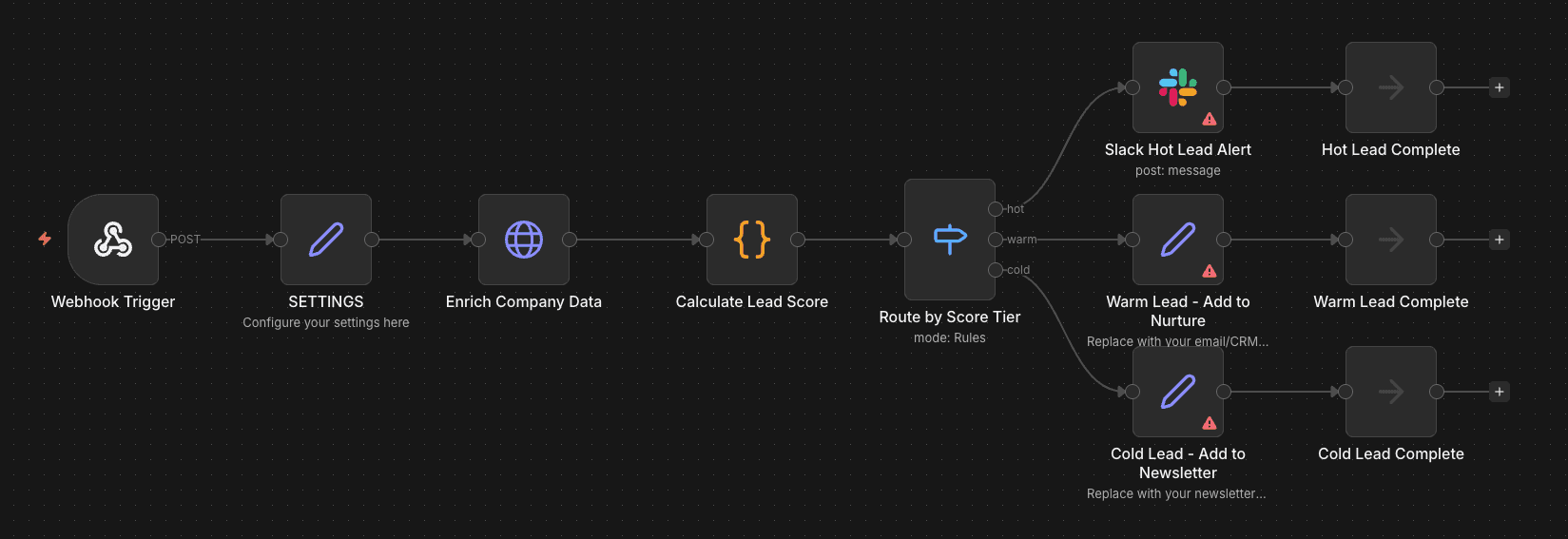
How to build a lead scoring workflow in n8n
Your sales team is wasting time on leads that will never convert while hot prospects sit in the queue getting cold. Lead scoring fixes this—here's how to build one in n8n.
Why automated lead scoring matters
68% of marketers say lead scoring is a top revenue contributor. Companies that automate lead management see 10%+ revenue increases. The difference isn't the scoring model—it's the automation.
Manual scoring doesn't scale. By the time someone reviews a lead, the moment is gone.
The workflow architecture
We'll build a workflow that:
- Receives leads via webhook (from your form, Typeform, etc.)
- Enriches lead data with company information
- Scores based on fit and engagement signals
- Routes to the right destination based on score
Webhook Trigger
      ↓
   SETTINGS
      ↓
Enrich Company Data
      ↓
Calculate Lead Score
      ↓
Route by Score Tier
      ↓
 ┌────┼────┐
 ↓    ↓    ↓
HOT  WARM COLD
Routing destinations:
- HOT (60+): Slack Alert → Sales rep
- WARM (35-59): Nurture sequence
- COLD (0-34): Newsletter
Step 1: Set up the webhook trigger
Start with a Webhook Trigger node. This receives leads from your form.
// Expected webhook payload
{
  "email": "jane@acme.com",
  "name": "Jane Smith",
  "company": "Acme Corp",
  "job_title": "VP of Operations",
  "message": "Interested in automation for our sales team"
}
Security note: Add header authentication. See our webhook security guide for details.
Step 2: Configure settings
Add a SETTINGS node (Set node in raw mode) to centralize your configuration:
{
  "enrichment_api_url": "https://api.clearbit.com/v2/companies/find",
  "slack_channel": "#sales-alerts",
  "hot_score_threshold": 60,
  "warm_score_threshold": 35
}
This makes it easy to adjust thresholds without touching the scoring logic.
Step 3: Enrich the lead data
Raw form data isn't enough. Use an enrichment API to get company details.
Add an Enrich Company Data node (HTTP Request) to call Clearbit, Apollo, or similar. The node extracts the domain from the email and fetches company info.
This gives you employee count, industry, funding, tech stack—signals that matter for scoring.
Step 4: Build the scoring logic
Now the interesting part. Add a Calculate Lead Score node (Code node):
// Lead scoring logic
const lead = $('Webhook Trigger').first().json;
const company = $('Enrich Company Data').first().json;
const settings = $('SETTINGS').first().json;

let score = 0;
const signals = [];

// Company size scoring
const employees = company.metrics?.employees || 0;
if (employees >= 500) {
  score += 30;
  signals.push('Enterprise (500+ employees): +30');
} else if (employees >= 100) {
  score += 20;
  signals.push('Mid-market (100-499 employees): +20');
} else if (employees >= 20) {
  score += 10;
  signals.push('SMB (20-99 employees): +10');
}

// Job title scoring
const title = (lead.job_title || '').toLowerCase();
if (title.includes('ceo') || title.includes('founder') || title.includes('owner')) {
  score += 25;
  signals.push('C-level/Founder: +25');
} else if (title.includes('vp') || title.includes('director') || title.includes('head of')) {
  score += 20;
  signals.push('VP/Director level: +20');
} else if (title.includes('manager')) {
  score += 10;
  signals.push('Manager level: +10');
}

// Industry fit
const goodIndustries = ['technology', 'software', 'saas', 'marketing', 'ecommerce', 'fintech'];
const industry = (company.category?.industry || '').toLowerCase();
if (goodIndustries.some(i => industry.includes(i))) {
  score += 15;
  signals.push('Good industry fit: +15');
}

// Tech stack signals
const techStack = company.tech || [];
if (techStack.some(t => t.toLowerCase().includes('hubspot') || t.toLowerCase().includes('salesforce'))) {
  score += 10;
  signals.push('Uses enterprise CRM: +10');
}

// Message intent signals
const message = (lead.message || '').toLowerCase();
const urgentKeywords = ['asap', 'urgent', 'immediately', 'this week', 'budget approved'];
if (urgentKeywords.some(k => message.includes(k))) {
  score += 15;
  signals.push('High urgency: +15');
}

// Negative signals
const email = (lead.email || '').toLowerCase();
if (['gmail.com', 'yahoo.com', 'hotmail.com'].some(d => email.includes(d))) {
  score -= 10;
  signals.push('Personal email: -10');
}

if (employees > 0 && employees < 5) {
  score -= 15;
  signals.push('Very small company: -15');
}

if (['student', 'intern', 'freelance'].some(t => title.includes(t))) {
  score -= 20;
  signals.push('Non-buyer title: -20');
}

const finalScore = Math.max(0, score);
const hotThreshold = settings.hot_score_threshold || 60;
const warmThreshold = settings.warm_score_threshold || 35;

let scoreTier = 'cold';
if (finalScore >= hotThreshold) scoreTier = 'hot';
else if (finalScore >= warmThreshold) scoreTier = 'warm';

return {
  email: lead.email,
  name: lead.name,
  company: lead.company,
  job_title: lead.job_title,
  message: lead.message,
  company_data: { employees, industry: company.category?.industry || 'Unknown' },
  lead_score: finalScore,
  score_tier: scoreTier,
  score_signals: signals,
  scored_at: new Date().toISOString()
};
When to use: Customize the thresholds and weights based on your actual conversion data. Start with estimates, then refine.
Step 5: Route based on score
Use a Route by Score Tier node (Switch node) to route leads:
| Score Tier | Score Range | Action |
|---|---|---|
| Hot | 60+ | Slack alert + CRM priority flag + auto-assign to senior rep |
| Warm | 35-59 | Add to nurture sequence + CRM entry |
| Cold | 0-34 | Add to newsletter + log for analysis |
For hot leads, add a Slack Hot Lead Alert node with this message format:
:fire: *Hot Lead Alert*

*Name:* {{ $json.name }}
*Company:* {{ $json.company }}
*Title:* {{ $json.job_title }}
*Email:* {{ $json.email }}

*Score:* {{ $json.lead_score }} ({{ $json.score_tier }})
*Signals:* {{ $json.score_signals.join(', ') }}

*Message:*
> {{ $json.message }}
Step 6: Add score decay (optional)
Leads go cold over time. Create a separate scheduled workflow that:
- Runs daily
- Queries leads without activity in 14+ days
- Reduces score by 10 points
- Updates score tier if threshold crossed
This prevents stale leads from clogging your hot queue.
What's next
Start simple. Get the basic workflow running, then iterate:
- Week 1: Deploy with default scoring weights
- Week 2-4: Track which scores actually convert
- Month 2: Adjust weights based on real data
- Ongoing: Add new signals as you learn what matters
The goal isn't a perfect model. It's a model that improves over time.
Download this workflow
Get the complete Lead Scoring Workflow ready to use. Choose your preferred method:
Email delivery
Community access
Join our free community to access this and 50+ other resources, plus get help from fellow builders.
Join WotAI CommunityStop guessing. Score your first workflow.
Score one workflow in about five minutes. Nine questions, a grade, and the specific gap holding it back - no call required.
Related Posts

Claude SSO and admin settings: how to set up a Claude Team org (2026)
How to set up Claude SSO on a Team plan: domain verification, Require SSO and the lockout traps, roles and JIT provisioning, every organization settings page and its Team default, and what needs Enterprise (SCIM, audit logs).

Claude Team vs Enterprise: who actually needs Enterprise (2026)
Claude Team vs Enterprise for a 2 to 150 person business: what the 20-seat minimum and usage billing cost, the compliance and identity features only Enterprise has, and a decision table for who actually needs it.
Claude for Small Business (2026): 43 workflows, the real cost, and when to skip it
Claude for Small Business is a free Anthropic plugin with 43 ready-to-run workflows for cash, payroll, bills, taxes, leads, marketing and hiring. What's in it, which Claude plan it needs, where it runs, how it compares to ChatGPT Business, and when to skip it.