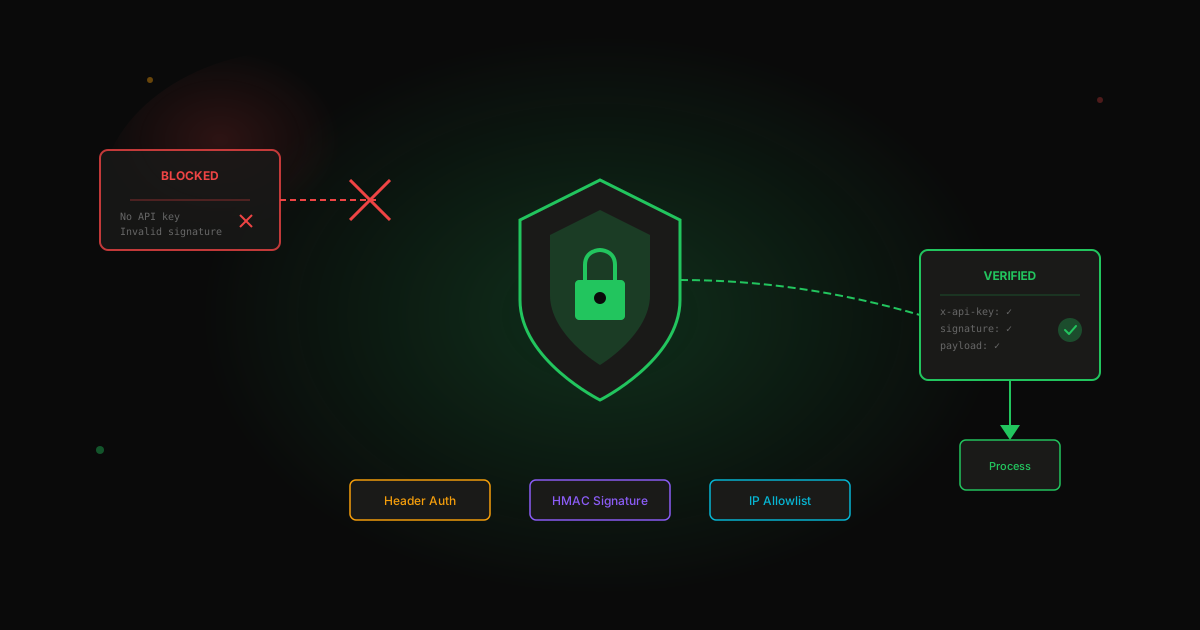
Webhook security basics you can't skip
When you create a webhook in n8n, you get a URL. Anyone with that URL can trigger your workflow. That's a problem.
Here's how to fix it.
The risk
An unsecured webhook can:
- Get spammed with garbage data
- Get used in DDoS attacks (you pay for the compute)
- Expose sensitive data if your workflow returns it
- Trigger unintended actions (imagine a webhook that creates invoices...)
Method 1: Header authentication
The simplest approach. Require a secret header.
In n8n:
- Webhook node → Authentication → Header Auth
- Set a header name (e.g.,
x-api-key) - Set a secret value
Now requests without the correct header get rejected.
# This works
curl -X POST https://your-n8n.com/webhook/xyz \
  -H "x-api-key: your-secret" \
  -H "Content-Type: application/json" \
  -d '{"data": "test"}'

# This fails
curl -X POST https://your-n8n.com/webhook/xyz \
  -d '{"data": "test"}'
When to use: Most internal integrations. Anything where you control the sender.
Method 2: Webhook signatures
Many services (Stripe, GitHub, Shopify) sign their webhooks. The signature proves the request came from them.
In n8n, use a Code node to verify:
const crypto = require('crypto');

const payload = JSON.stringify($json);
const signature = $headers['x-signature'];
const secret = 'your-webhook-secret';

const expected = crypto
  .createHmac('sha256', secret)
  .update(payload)
  .digest('hex');

if (signature !== expected) {
  throw new Error('Invalid signature');
}

return $json;
When to use: Receiving webhooks from third-party services that support signatures.
Method 3: IP allowlisting
If you know exactly where requests should come from, block everything else.
This requires infrastructure-level configuration (nginx, Cloudflare, etc.), not n8n config.
When to use: High-security environments. Known, fixed senders.
Method 4: Request validation
Even with auth, validate the payload:
// In a Code node
const required = ['event', 'user_id', 'timestamp'];
const missing = required.filter(f => !$json[f]);

if (missing.length > 0) {
  throw new Error(`Missing fields: ${missing.join(', ')}`);
}

// Validate types
if (typeof $json.user_id !== 'number') {
  throw new Error('user_id must be a number');
}

return $json;
When to use: Always. Defense in depth.
Common mistakes
Using production URLs in test mode
Your test webhook is a different URL. Don't expose prod webhooks during development.
Logging sensitive data
Webhook payloads often contain PII. Don't log full payloads to public channels.
Trusting the payload
Never use webhook data directly in database queries or commands without validation. Basic injection protection applies here.
Minimum viable security
At minimum, every production webhook should have:
- Header authentication or signature verification
- Payload validation
- Rate limiting (if your infrastructure supports it)
Takes 30 minutes to set up. Saves you from 3am incident calls.
Building webhooks into your automation? Let's make sure they're solid.
Stop guessing. Score your first workflow.
Score one workflow in about five minutes. Nine questions, a grade, and the specific gap holding it back - no call required.
Related Posts
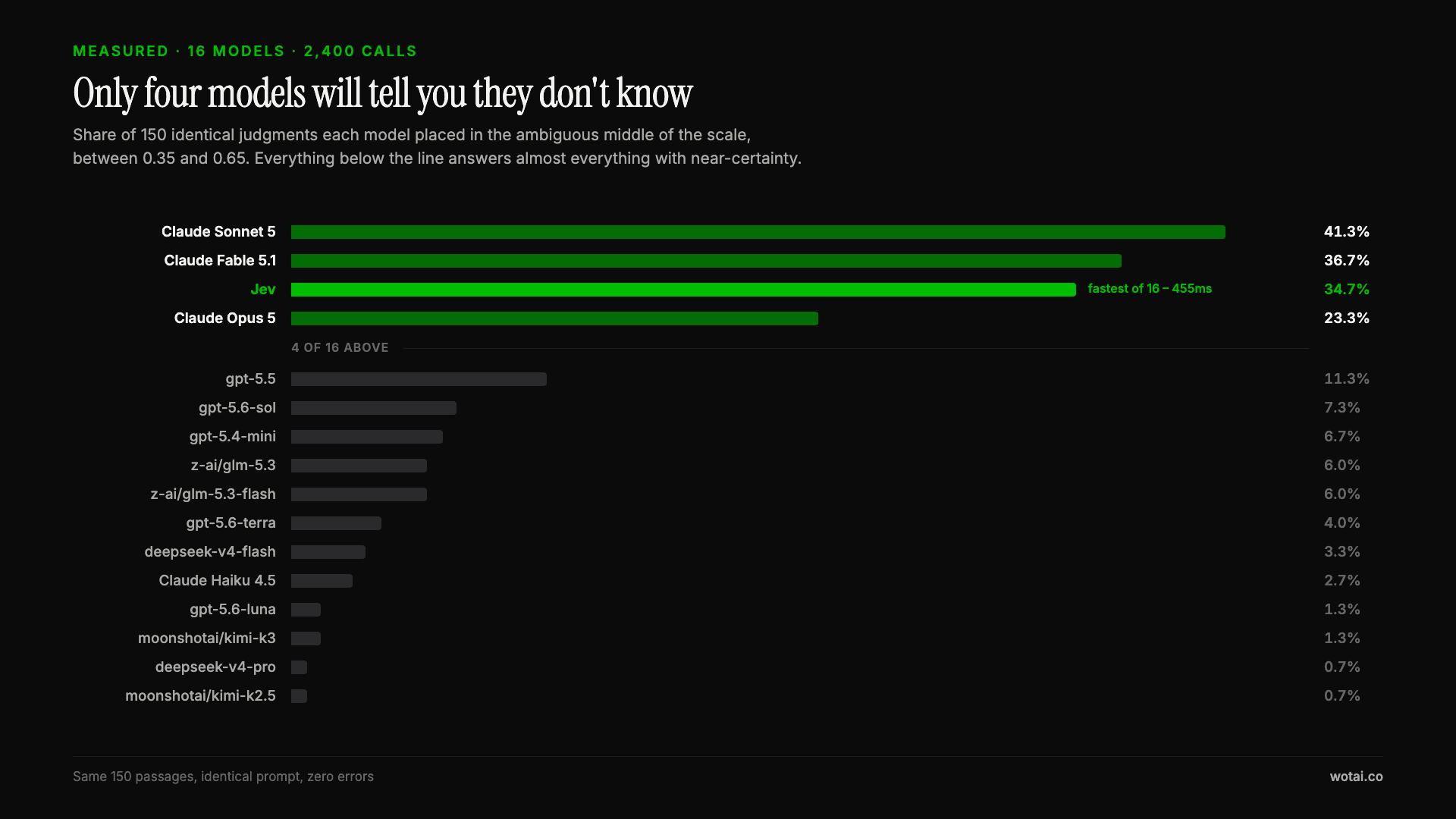
Jev is the only sub-second model that will tell you it doesn't know
Sixteen models on the same 150 passages, plus two more tasks. Only four of the sixteen will say they are unsure, and Jev is the only one of those four that answers in under a second.

AGENTS.md vs CLAUDE.md: which file your agent actually reads
Both files in one repo, measured: load order, token cost, and which one wins when they disagree. Every guide explains the difference; this one runs the test.

Compound engineering vs Superpowers: what each one installs
Both Claude Code plugins installed and measured: 14 skills against 33, one SessionStart hook against none, and the six skills that collide when you run both.